
In the latest Radio-T we had guests from Parallels who enthusiastically told us about their new remote access program Parallels Access. As usual, they gave us codes for the product, though I haven’t figured out where to enter this code yet, so I tried their official 2-week trial. Already got impressions, good and varied.
At first glance, this thing looks very decent. Sometimes even delivers a wow effect. Indeed, remote work with applications from my Mac has never been this… unstressful. Standard remote access programs (I’ve long used Remote VNC in this capacity) don’t even try to beautify the process and result this much, giving honest access to the desktop. Of course, even such remote access is better than nothing, but the problem of displaying my two (24" and 27") monitors on an 8" iPad mini is solved head-on there — either by shrinking everything or by selectively zooming part of the screen.
From the description and pictures at the link above (I won’t repeat all that, go look for yourself) it’s clear that Parallels Access has a completely different paradigm. After installing the client on Mac, you connect through it and it tries to “make it beautiful for you” on iPad. There’s no special mystery here, the main computer’s screen switches to a mode compatible with iPad by pixels, and instead of wandering around the remote desktop you switch/launch programs on iPad in a more adequate way — through a kind of taskbar and special “launcher” on iPad.
If you look at the computer screen at the same time, these transformations certainly aren’t for the faint of heart. Probably better not to see how all your lovingly arranged windows get mixed into a heap, the screen switches to low resolution, and instead of an independent second screen a mirror of the first appears. But if you don’t look at that and focus on the iPad, almost magic happens there. All launched programs look as close to the familiar iOS “full screen” mode as the authors could imagine. For reasons unclear to me, even those Mac programs that could work in honest full screen don’t do so, but simply expand to full screen, which is also fine.
Controlling these programs from iPad deserves all kinds of encouragement and petting of the authors. It isn’t mouse emulation like everyone else’s, but tries to be cursor-free, like all normal iOS programs. This works and then some. Various gestures help make our life even better, and even drag-and-drop, not to mention simpler scrolls and pinches, can be done without disgust, but on the contrary. Even the right mouse button is easy to press, which is important for button appreciators.
All this works very snappily on the local network, how it’ll be outside — I’ll check in that mode too. The program can pipe sound through itself, so you can hear iTunes running on the computer but playing on iPad. About video — not sure, didn’t try.
All this joy costs a lot. Besides, this is a subscription price, not for the program (the program is free) and will cost you $49/year. Hard to say how adequate this is to my expectations, but it feels like “horse price” and “are they serious!” Though… no, still a horse price.
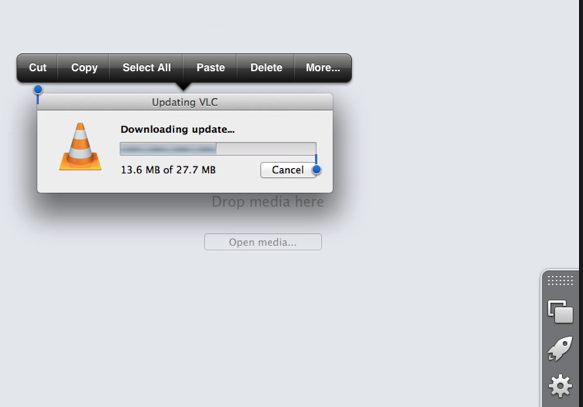
Now what’s bad without any subjectivity, like price. There’s plenty of bad too. First and most annoying — extra intelligence that gets in my face and suggests stupid things similar to the standard iOS “balloon,” the one that invites you to copy and paste something. It pops up completely autonomously without any understandable logic and without my active participation and annoys incredibly with its incomprehensibility and spontaneity.
Second — attempts to restore my monitor after disconnecting the program can only be called conditionally successful. Some remain at maximum (for iPad) size (Skype for example), some forget which monitor they were on, some shift slightly. But overall, it restores quite successfully, about 90%.
And last — about the existence of programs with more than one window, the authors seem to have forgotten. I have a bunch of Terminal windows open, several TaskPaper windows, and for Parallels Access there’s only one of this bunch and how to go to another I didn’t figure out. There are also annoying minor bugs — for example, switching to desktop mode and back scared me badly, leaving the computer screen after disconnect in “adapted state” and moving my dock down (it’s normally stuck to the side in life).
But by and large, this is a program with capital P and can even now be used, and once they fix the quirks it might even be worth its price. In short, recommend at least trying it. I suspect some of what I criticized here is related to my 2 monitors and maybe for normal people everything’s fine already with one.
UPD: Found that you can actually switch between windows from their taskbar. And tried video through VLC — works.
This post was translated from the Russian original with AI assistance and reviewed by a human.