
I’m not a fanatic or even a warm supporter of various magical tools and super-methodologies that “will help you achieve success and live right” and of course magically improve your process (whatever you do) so much that the result becomes unimportant. But there’s one exception. For me it’s completely impossible to keep a list of tasks, ideas, and accompanying information in my head. First — there are many of them. Second — they sometimes arise fleetingly and if you don’t capture them right on the spot they’ll disappear from your head or be displaced by other fleeting thoughts. And lastly — sometimes these are complex thoughts, non-simple ideas, and non-trivial solutions. If you don’t capture them somehow, next time you’ll have to think them up again.
This is all to say that to-do lists of varying complexity seem like a very sound idea to me. Around these lists there’s also a lot of stuff piled on and I’ve even applied some methodologies in places (I’m hinting at GTD), but watching myself and analyzing what exactly helps in the matter and what’s complete nonsense not worth the time, I came to a simple and convenient system for myself. This system is multi-component and I can’t manage a review of all its elements, but will only mention:
- At the center of my “work automation” lies a smart and universal system for searching anything, and a unified interface for entering everything, starting from tasks, calendar events, and up to notes. I’m talking about the incomparable program Alfred. For me this is a single entry point into everything, and everything related to task management gets into the computer through Alfred.
- Events tied to a specific date go into the most standard Calendar, though they get there by a quite intricate path. I enter them through Alfred which passes them to Fantastical and then to Calendar. Fantastical in this chain is for natural language support and for quick, one-click overview without going into Calendar.
- Notes, jottings and other unsystematic things go into nvALT. By the way, I collect podcast notes in it too.
But here I was planning to talk not about general self-organization, but only about one element — the task list. It can be called ToDo List, Task List and various other words, but essentially for such a program I have a number of simple and direct requirements:
- Ability to enter quickly without leaving the task and without going into a special program.
- Ability to group tasks by subtasks in some hierarchy
- Support for “Inbox” idea for quick dumping and presence of means for simple and convenient sorting and moving from Inbox
- Accompanying notes/texts for each task and task group with ability for convenient closing/opening.
- Overall simplicity of management. Everything should work through keyboard shortcuts.
- A program I look at this often shouldn’t cause aesthetic revulsion.
- Support for synchronization between several Macs.
- iOS client, at minimum for reading the task list and, of course, with synchronization.
- Overall program lightness, fast interface.
- Search across everything.
- Some additional “flat organization” system like tags, contexts, or something else of this sort.
This is the minimal list that immediately came to mind, but even it is quite a tough target. Finding something that would satisfy me on the list was quite difficult. Historically, I used OmniFocus for many years. Despite its horse price and somewhat specific appearance (I like it, but it’s an acquired taste) I acquired all its versions and even wrote a mini-review of one of them. However, about a year ago, when the number and variety of my tasks sharply increased, what was normal and convenient before started getting in the way. Organizing tasks by contexts, which is the only way of intra-project “flat” organization in OF, became a fifth wheel on the wagon. Very limited task sorting capabilities, inability to set priorities, search limitations and various other small things here and there also started annoying me gradually.
When they announced OF2 release I was a bit happy and decided to wait with making a decision about possible transition to something more suitable for me. A couple days ago I finally got access to their private beta and completely deflated. It’s not that it’s beta, and that it lags unrealistically and glitches even more (already sent about ten bug reports). No, the issue is that from a relatively flexible system which with a file and much cursing could be adapted to your cases, they’re quite clearly going toward popsy competitors and stubbornly driving OF2 into something like Things. No, I won’t explain in depth my heavy impression of OF2, since this is still beta and besides, private beta. Better to say a few words about where and how I switched.
Strangely enough, I essentially had no real choice. I honestly checked all options I could reach, at least a dozen. About the same number more I tried to evaluate from others’ words or from demo and documentation. If you say in comments “why not take NNN,” then with high probability I already tried this NNN and rejected it. And from all the variety of such things, only TaskPaper turned out close to what I want. And even it isn’t “wow, that’s it!”, but closest to the goal.
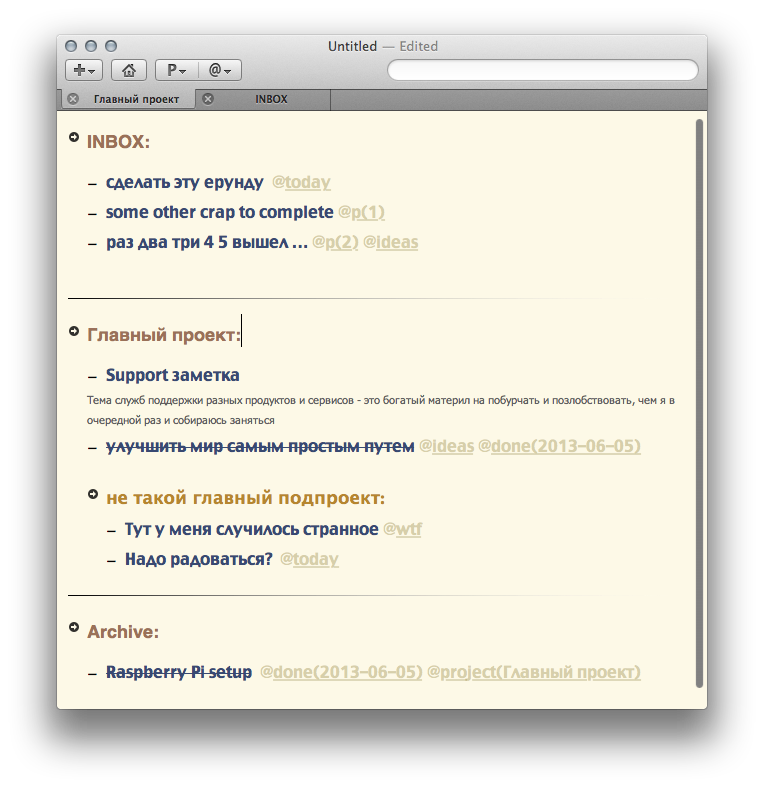
Essentially, TaskPaper is a very minimalistic product. It has nothing superfluous for me, but has almost everything needed. For my entire list of points, TaskPaper can get a checkmark, though sometimes not very thick. Everything looks quite ascetic and somewhat reminds of nvALT’s laconicism.
Sections, tasks, and notes aren’t separate rigid entities, but can easily transform into each other. Adding “:” at the end of a line we turn this line into a project. Adding another one — another project. Shifted it with a tab — and it became a sub-project. Removed “:” and it’s just accompanying information. Added “-” at the beginning and got a task. That is, this is almost a manual, text list that you can change however you want right in their most ordinary text editor.
Of course, this is more than just a text editor. As soon as you create a new “entity,” for example a task, it will be shown on screen precisely as a task. That is, there’ll be a place to mark it as “done” in one click or keyboard combination. The project list is also shown and you can switch between projects in different ways. Moving tasks from project to project, archiving completed ones, focusing on a project — all this is done elementarily and conveniently.
There’s tag support and even support for special tag groups. For example, you can specify @priority(1) and @priority(2) and get either all tasks with @priority tag or only for a specific value of this priority. For tags there’s quick navigation right from the toolbar or (which is much more convenient for me) from the search field. Essentially, search here is the main means of everything and when you click on a tag or project name or do something else for selection — essentially TaskPaper will enter this into the search field instead of you. And everything it enters there can be done yourself and even much more than basic actions. For search here there’s its own small but mighty query language in which you can write something, for example like this:
project Inbox and not @done and (@priority > 1 or @today)
For basic TaskPaper work you don’t need to learn exactly how to write queries — clicks are enough here. But over time it’s worth reading the documentation — there’s very little there, but it’s useful.
In TaskPaper you can work with several independent documents simultaneously. Yes, all these lists are essentially specially formatted documents and nothing more. For me it turned out convenient to have one document for home things and one for work. From the quick input window (by system-wide hotkey combination) you can add to any of the documents of your choice.
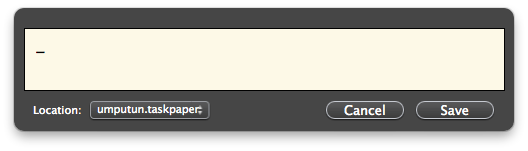
TaskPaper’s appearance pleases my sense of beauty and, within reasonable limits, can be modified. You can even create your own themes or directly edit others’. Everything’s simple there and to make the spacing between task lines as I like, it took one Googling and 2 minutes of editing.
All superfluous visual elements can be removed from the window and leave a clean task list. Personally I did exactly that.
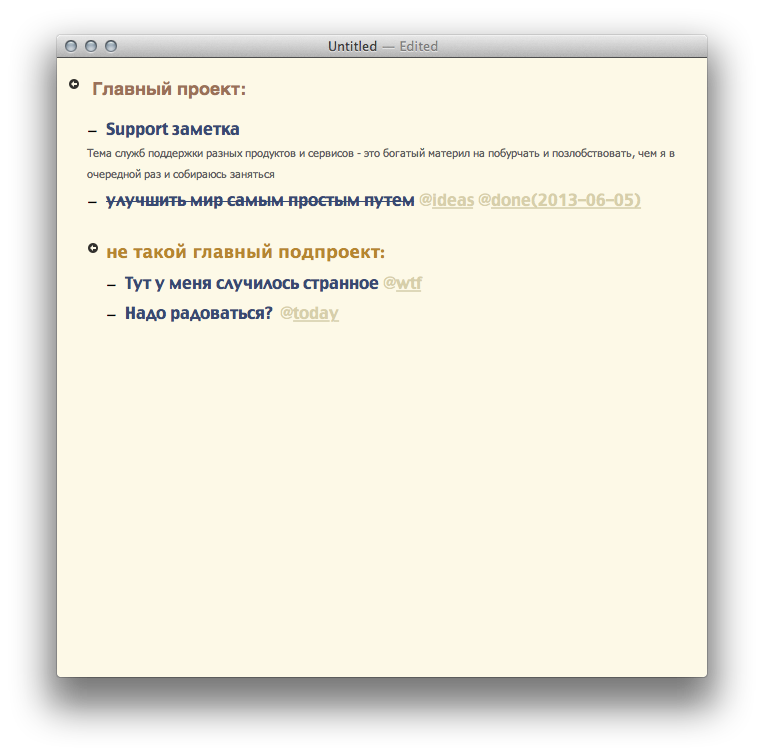
In each document you can open several tabs and each will have its own independent search. This is where the first complaint begins — search (query) isn’t saved. As far as I understand, this goes against the author’s vision and despite user requests he stubbornly refuses to add this. But there’s an external solution for this. In terms of extending TaskPaper functionality, keyboard and scripting connoisseurs will find various possibilities for extension. For normal people you can find all kinds of ready-made stuff too. For example, Hide_and_Show_Notes turned out very, very useful for me. Here you can discover other joys for yourself too.
From the speed perspective — no complaints. Everything always flies. From the reliability perspective — hard to say yet, I don’t have that much experience, but haven’t noticed anything crashy so far.
From shortcomings I’ve encountered one so far, but quite unpleasant. TaskPaper synchronization is done through Dropbox and, as far as I understand, this is the method recommended by the author. So, this synchronization sometimes, when attempting to save, asks a strange question and warns that the document changed and you’re trying to save an old version. As far as I see — this is a bug. There’s no conflict in this case, but the program determines something incorrectly. I don’t agree to Revert and say “Save anyway” and haven’t seen any consequences of this choice yet. But this is a bug undoubtedly. At the same time, when updating the document in Dropbox it promptly updates in the program. It seems to me there’s a conflict between OSX’s system versioning service and sync. Interesting, can versioning in OSX be disabled for one application? This would probably solve the problem.
The iOS program also exists and is also simple and working. Honestly, I’m not thrilled with the iOS version, everything there is done so much through… gestures that for me it’s too much. But on iOS I rarely edit tasks, so for me it’s not a problem.
In conclusion I’ll say there’s some zest in this TaskPaper, something right, true and homespun. Not sure this can be proven somehow, but it seems very suitable to me. Quite possible that for someone Things or Wunderlist will be closer to the heart, but my choice is TaskPaper — simplicity that’s better than theft (just came up with an advertising slogan for TP ;)
P.S. As a bonus, a small Workflow I assembled for myself (Alfred2) to add to Inbox
And here’s another one I found, strange but very useful — Extended Notes. I used it to bind extended notes to nvALT through Alfred.
UPD: solution to the main synchronization problem found and verified! As I expected, needed to prohibit OSX version support for this program and everything became just beautiful, no glitches and no strange messages. Here’s the magic command for you:
defaults write -app 'TaskPaper' ApplePersistence -bool no
This post was translated from the Russian original with AI assistance and reviewed by a human.