
Services where you can drop any file and then give the link to all interested parties are a dime a dozen. Starting with Dropbox paired with, for example, Dropzone and ending with a mass of all kinds of “all-in-one” solutions like Droplr, CloudApp and many other varieties. You’ll ask me, why then spend my time searching for and developing my own version of all this stuff? “You’ll find out about it if you go where I take you.” (c) I. Babel
What’s my problem with dropping into Dropbox, whose name is so consonant with our goal? The thing is, Dropbox for me is an important means of file synchronization and shoving all temporary/shared stuff into the public folder seems to me like a circus on the verge of chaos. Besides, it seems that in Dropbox now these public things aren’t so direct and links lead to a Dropbox page instead of honest direct links that we need. And of course, here you can easily hit the traffic limit, especially for free accounts, which will lead to blocking the entire folder with the offending file.
With Droplr and CloudApp my main problem is indirect links, i.e., again landing on an intermediate service page where you can download and/or view the desired file. Probably there too you can hit limits, but I didn’t particularly investigate this question. Besides, I want the upload to this storage to be flexible and simple, so it can be attached to anything at hand, for example to my beloved Alfred.
From all this and another dozen other reasons that I don’t remember now, an irresistible desire arose to set up my own simple sharing service (a bike named after me), exclusively for personal use. I remember when Skitch got ruined and closed its direct image hosting in favor of less direct Evernote — I quickly set up a small virtual server with entry (upload) via SCP and distribution through Nginx. At the same time I added a new standard element to Dropzone for SCP Upload, which is clever enough to put the correct http link back into the clipboard as a result.
But I wanted to improve even this. First, I wanted to do something with the names of files being uploaded. I.e., when uploading a file “bobuk naked no sms.jpg” I wanted as a result to get some more persistent and less predictable “personal” url like http://drops.from-me.org/YzBkZDVlOGI5ZWFmYmNlZjlmYWRkZDAx.jpg and, of course, immediately in shortened form like http://bit.ly/YF1E8d

Making this is not just simple, but very simple. Here’s the script for Alfred, the one in the picture, that does exactly this:
	#!/bin/bash
	fname=$(basename {query})
	file_ext=$(echo $fname |awk -F . '{if (NF>1) {print $NF}}')
	ofname=$(date +%s | md5 | base64 | head -c 32).$file_ext
	scp {query} name@server:/path-to-drops-on-server/${ofname}
	curl -s --data "apiKey=[your api key]&login=[your login]&longUrl=http://[your-url]/$ofname &format=txt" http://api.bitly.com/v3/shorten | tr -d '\n' | pbcopy
	echo -n "$fname dropped, link in clipboard"
This needs Silent and Action checkboxes set and in Advanced choose “Output to Notification Center”. And that’s it, ready. Position yourself in Finder on the needed file, press the key combination for Alfred Action (I have option + command + \ ) and choose/type the title of the action you want to perform. Smart Alfred will even show you a preview for files it understands. After selection everything will go to the server and, upon completion of upload, the short result will be in your clipboard.
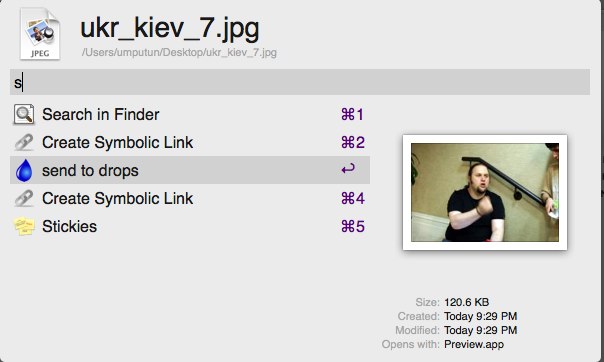
So, the first part of the Marleson ballet (for connoisseurs — also Merleson) is completed. But the task is only half done. Yes, hot keys are everything, but sometimes it’s more convenient to just grab something and drag-and-drop it somewhere, and you want a similar result.
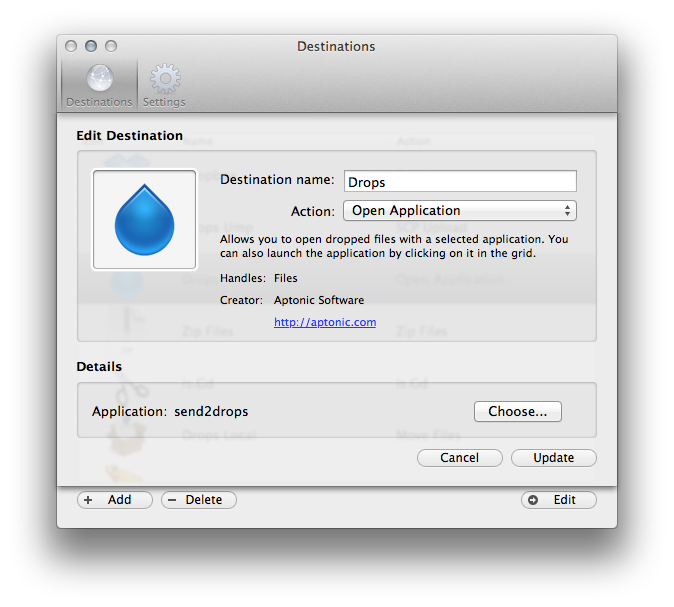
Here I, as a person who understands little about ruby, was initially stumped. The thing is, such extensions for Dropzone are written in this very ruby, but hurray — it (Dropzone) can launch a program as an action. It’s called “Open Application”, which is quite logical. Then it’s a matter of technique — open Automator, add “Run Shell script” from the Actions list and paste the same code there, in which you only replace {query} with $1. Make sure that in Pass Input we have “as argument” and save as Application wherever your heart desires. Mine desired to save in one of the Dropbox folders so it would spread itself across all machines. Adding this thing in Dropzone itself is 2 clicks, there’s not much to describe here. By the way, if you don’t have Dropzone or its analog (does anyone know any analogs?) you can add the icon of this new “application” to the Dock and drag directly onto it.
Well, that’s it — the “service” is ready. There’s room for improvement, for example drawing beautiful previews of all files in storage, but showing this only to the paranoid owner, or to the whole world if that’s more pleasant for you. You could imagine with some fantasy that from this page by clicking you could get back the same short url. If someone writes that for a browser — I’ll be happy and grateful.
And of course, if you don’t have a place where you can set up a small VM in the cloud and you’re cheap about 5 kopecks on AWS, but you have home internet — all this can probably be run too. Even on RPi it should work without problems, I tried it. And of course this is easily adapted to work directly with S3 by replacing scp with s3cmd
P.S. Yes, this code won’t work correctly with file names that have spaces. But I’ll leave this fix to you as homework. When you’re proposing your variants — check first. scp + bash work amusingly in such cases.
This post was translated from the Russian original with AI assistance and reviewed by a human.