
Today they delivered my Raspberry Pi — a very small, single-board almost-like-real computer. This is model B, 512M. As I wrote on my twitter everything together, including the computer itself ($35), transparent plastic case ($18) and WiFi-USB ($12) with quick delivery and taxes came out to $80.
As people hinted to me — not cheap at all for a computer they promised to “give away” for $25. To be fair, both the plastic case and WiFi could have been skipped, simply connecting the board with a wire to ethernet. But to be even more honest, there can be other expenses too — you need a 4GB SD card (or more) and a power supply with micro-USB output. Both of these components can always be found in any geek’s household and I easily found both a power supply and an 8GB card.
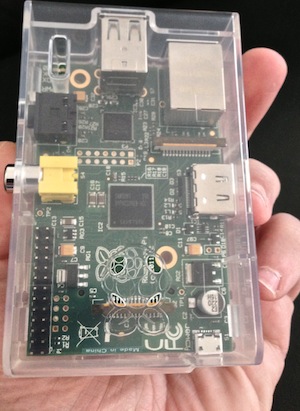
I won’t tell you about how to flash the card (google is your friend), but for the laziest you can buy a ready one, with everything you need, for $12-$15. You’ll laugh, but for me this flashing didn’t work the first time. Did everything as needed, turned it on and got a black screen. Looked at this perplexed for about 5 minutes, thought maybe it loads that slowly. Then decided there’s not enough power and replaced the Apple adapter with the one that came with my 4g-WiFi (there’s a completely brutal one by current) and … nothing fixed. Was almost ready to send it back and demand replacement when I noticed that the flashed SD card was still sitting forgotten in the computer :) Inserted it into the Pi — and everything immediately took off.
The boot process (I used their official variant — Raspbian “wheezy”) of the little one is very quick, probably 15 seconds. For those who’ve seen debian, Raspbian raises no questions — the same debian, not even a side view. WiFi USB detected itself, without the dances I was ready for. Right on the desktop an icon for GUI configuration of this wifi and it works as it should. In graphical mode (I output to an Apple Cinema 24") everything works very thoughtfully, about like on the netbooks that rest in the trash heap of history, or maybe even slower. Probably one can imagine a variant of home use as a computer for a child, where nothing but a browser is needed, but even just for a browser the firmware I tried works slower than desired. I’m tormented by an almost certainty that this can be heavily optimized and I won’t be surprised if such distributions exist in nature. However, I don’t seem to need such use, so I didn’t investigate this question in more detail. If you have experience making a fast browser out of Pi — write in the comments.
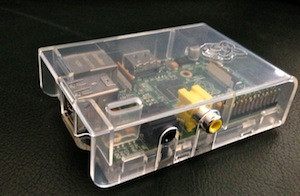 It seemed more interesting to me to play with it as a super-small, headless and low-consuming server. Honestly speaking, I don’t feel any practical necessity for such a server either, but I just wanted to and that’s all. Installed a minimal set that I always mount on my servers (mercurial, java7, nginx and other small stuff) and started trying. Of course, this box doesn’t amaze the imagination with its performance, especially if compared with the big servers I mercilessly exploit at work. However, experience working with the most modest instances in the AWS cloud taught me the idea that even little ones can be good for something.
As a result, I set up a copy of the site on this micro-server. You can go right now to p2.umputun.com and enjoy the result. It’s of course slower than usual, but not at all because of lack of Pi’s power, but because of quite modest speeds of my home internet for outgoing. For interest, I tried loading this “server” and here’s the result, quite decent:
ab -n 1000 -c 10 http://p2.umputun.com/
This is ApacheBench, Version 2.0.40-dev <$Revision: 1.146 $> apache-2.0
Copyright 1996 Adam Twiss, Zeus Technology Ltd, http://www.zeustech.net/
Copyright 2006 The Apache Software Foundation, http://www.apache.org/

Benchmarking p2.umputun.com (be patient)
Completed 100 requests
Completed 200 requests
Completed 300 requests
Completed 400 requests
Completed 500 requests
Completed 600 requests
Completed 700 requests
Completed 800 requests
Completed 900 requests
Finished 1000 requests


Server Software:        nginx/1.2.1
Server Hostname:        p2.umputun.com
Server Port:            80

Document Path:          /
Document Length:        31387 bytes

Concurrency Level:      10
Time taken for tests:   32.216737 seconds
Complete requests:      1000
Failed requests:        0
Write errors:           0
Total transferred:      31626360 bytes
HTML transferred:       31413936 bytes
Requests per second:    31.04 [#/sec] (mean)
Time per request:       322.167 [ms] (mean)
Time per request:       32.217 [ms] (mean, across all concurrent requests)
Transfer rate:          958.66 [Kbytes/sec] received

Connection Times (ms)
              min  mean[+/-sd] median   max
Connect:       30  100 313.1     66    3088
Processing:   123  215  61.7    207     545
Waiting:       36   75  47.5     68     397
Total:        166  316 317.2    271    3316

Percentage of the requests served within a certain time (ms)
  50%    271
  66%    306
  75%    326
  80%    337
  90%    368
  95%    410
  98%    566
  99%   3215
 100%   3316 (longest request)
If we exclude the internet from this, we get about 190 requests per second.
I also tried running various services of mine — jutw, rt-jc (system supporting radio-t chat), pubcdn (my CDN redirector) and even ukeeper worker. All these are Java things and they all worked quite adequately. I.e., so adequately that jutw can simply be left for permanent residence, and pubcdn can be put in the back burner and if data center failure happens, then it’s quite possible to use as a backup solution. For ukeeper I had to limit some parameters a bit (there it tries to use everything to the maximum), but in the cut-down variant and with a not-high level of parallelism, Pi behaved very worthily.
In my experiments I loaded the little one to extremity for quite a long time and didn’t discover any noticeable heating. To the touch it’s slightly warm, just a tiny bit. No falls, disconnections and annoying reboots were noticed. Obviously, it doesn’t make noise, because there’s simply nothing to make noise, there’s nothing that moves.
In general, you can come up with a lot of different things with this Raspberry Pi. Some ideas can be easily found on the internet. Obviously, if you look at this thing more broadly, and use it not only as a computer, but also as a control controller — then there’s a sea of applications. I’m thinking in this direction too, although I haven’t thought of anything useful yet. Most likely we’ll figure something out with my daughter together, attach it to some smart toy to make it even smarter. Such experiments are easy to do — changed the card, connected the needed peripherals, and you have completely new functionality.
Yes, almost forgot — Pi can be used as a media center. According to reviews of those who tried — XBMC works and plays movies.
What are you doing with your Raspberry Pi?
This post was translated from the Russian original with AI assistance and reviewed by a human.