
After the tragic demise of Sparrow, I faced the need to find some solution for email that would allow me to keep my Gmail open as a separate application. Without going into philosophical debates about “the right way” and “should be in the browser”, I’ll just say it’s inconvenient for me. For my use case, email must be a separate program, period. After trying everything I could reach, I came to the disappointing conclusion - there are no decent email clients for Mac. No, of course there’s the convenient Mail.app and I have no substantial complaints about it, but I fundamentally separate work email from personal, and Mail.app is already sitting on work Exchange and a couple of IMAPs.
As a result of my research, I came to the conclusion that the best solution would be to keep email in a separate browser and use web Gmail. From what I wanted to “fix”, my list included: remove ads, remove (if possible) unnecessary elements from the screen, have some visible indication of new mail. By the way, I have nothing against advertising, but in emails it takes up too much space and narrows the visible area of the letter quite substantially. Well, and for peace of conscience - I have a paid account, the one without ads, but I don’t use it for a number of historical reasons. So I’ve already paid for the absence of ads and don’t need to feel guilty about it.
So, I considered 3 options:
- Using MailPlane. I used this for quite a while, but over time they started adding various unnecessary stuff, stability began to deteriorate before my eyes, and even the freshest versions worked terribly with Google’s two-factor authentication.
- Use another browser (my main one is Safari) in “application” mode. In practice, this is a conditionally working solution. You can launch Chrome this way and with a couple of extensions remove everything unnecessary from Gmail, but keeping an additional voracious browser is not the best idea. Plus links from this “application” open in Chrome, which is not at all what I wanted.
- Use Fluid to extract Gmail into a separate program and its customization capabilities. I settled on this and have been living with Gmail under Fluid for the last few months.
The result is what you see in the picture. Achieving this look is not difficult, but you’ll need the paid version of Fluid.
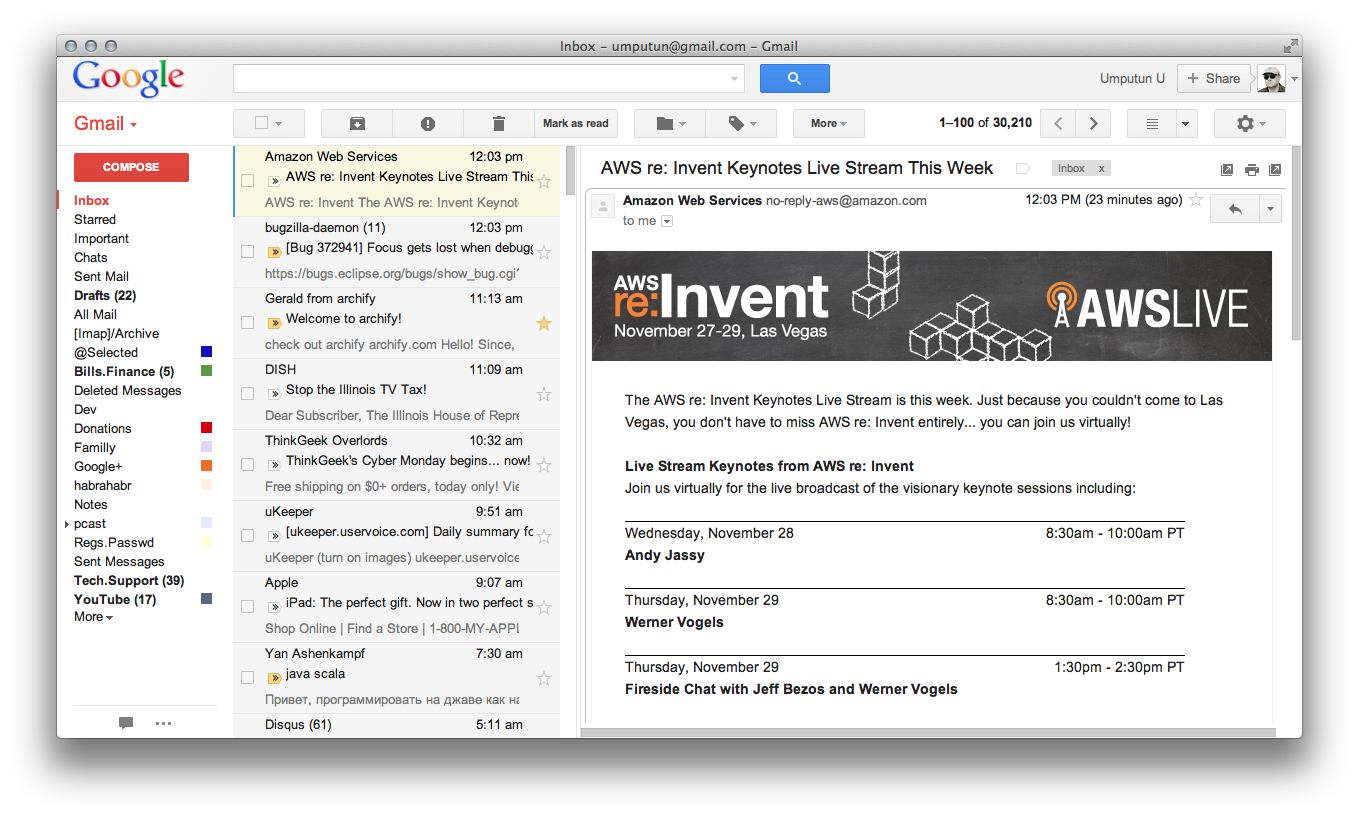
Below point by point, what and where to add:
- In Window/Userscripts find Gmail and change the code that’s there to the one below. The purpose of this action is to fix the new mail indicator in Dock Badge (starting with version 1.6 it doesn’t work out of the box):
function updateDockBadge() {
    //console.log("Running check for unread messages…");
    var oldBadge = window.fluid.dockBadge;
    var newBadge = '';

    var myItems = document.getElementsByClassName("n0");

    for (var i = 0; i < myItems.length; i++) {
        var myTitle = myItems[i].title;
        var pos = myTitle.search("Inbox")
        if (pos >= 0) {
            var matches = myTitle.match(/\((\d*)\)/);
            if (matches) {
                newBadge = matches[1];
            }
        }
    }

    window.fluid.dockBadge = newBadge
    if (newBadge != '' && newBadge > oldBadge) {
        window.fluid.playSound("Basso")
        window.fluid.requestUserAttention(true);
    }
}

setInterval(updateDockBadge, 5000);
- Add styles in Windows/Userstyles:
.mq { display:none; } .N92wfe { border-top:none; } .nH.PS { margin: 52px 0 44px 52px !important; } .Zs { display:none; } .u5 { display:none; }


.adC { display:none; }
.z0DeRc { display:none; }
.oM { display:none; }
.u7 { display:none; }
.nH.PS { display:none; }
.ao8 table tr td.Bu + td.Bu { display:none; }
td.Bu.yPPMxf { display:none !important; }
td.Bu.y3  { display:none !important;}
.aiw .qp { margin-top: -25px; }
#gbgs1{display: none !important}
.apN .hx {
  padding-left: 2px !important;
}
.if {
  margin: 3px 8px 8px 2px !important;
}
.hx .adn, .hx .adu, .hx .adf {
  padding-left: 4px !important;
}

/* "Display images" margin */
.B0, div.acS, .bC, .adc, .gY, .adc, .gS, .ac7, div.h9, div.adI {
  margin-left: 0px !important;
}
.B0, .ac7, .acS, .gS, .adp, .h9 {
  margin-right: 10px !important;
}

.Bk,
.hx .ky .Bk,
.hx .kv .Bk,
.hx .h7 .Bk,
.hx .kQ .Bk,
.xG3.G2 {
  border: 1px solid #BBB !important;
  border-bottom-color: #BBB !important;
  -webkit-border-radius: 7px;
  border-radius: 7px;
  border-image: initial;
  background-color: white !important;
}

.Bk .G2 {
  border-top-width: 0 !important;
}

.hx .h7 .Bk,
.hx .kv .Bk,
.hx .ky .Bk {
  margin-bottom: 4px !important;
  border-radius: 7px !important;
}

.kQ .G2 {
  height: 12px !important;
}

/* closed messages */
.hx .kQ .Bk,
.hx .kQ .Bk .G2 {
  height: 8px !important;
  padding: 0 !important;
  margin: 0 0 -4px 0 !important;
}

.kv .Bk .G2,
.kQ .Bk .G2 {
  background-color: transparent !important;
}

.hx .kQ .Bk .G2 {
  border-bottom: 0 !important;
  border-radius: 7px !important;
}

/* contents */
/* header */
.hI, .ig, .iv, .hF, .aju {
  padding-top: 4px !important;
  overflow: hidden !important; /* mostly for left edge */
  border-radius-top-right: 7px;
}
/* gradient stuff - being replaced by
  http://userstyles.org/styles/70673/gmail-messages-with-gradient-header
  */
.hI, .ig, .iv, .hF, .aju {
  /* gradient for message header */

  /* For WebKit (Safari, Google Chrome etc) */
  xbackground: -webkit-gradient(linear, left top, left bottom, from(#edeeef), to(#fff)) !important;
  /* For Mozilla/Gecko (Firefox etc) */
  xbackground-image: -moz-linear-gradient(#edeeef, #fff) !important;
  /* For Internet Explorer 5.5 - 7 */
  xfilter: progid:DXImageTransform.Microsoft.gradient(startColorstr=#EEEEEEFF, endColorstr=#FFFFFFFF);
  /* For Internet Explorer 8 */
  x-ms-filter: "progid:DXImageTransform.Microsoft.gradient(startColorstr=#EEEEEEFF, endColorstr=#FFFFFFFF)";
}

/* Adjust padding around the image for the author - override gradient style. */
.adf .aju {
  padding-bottom: 0 !important;
}

/* padding around the person's image */
.adf.ads, .adn.ads {
  padding-left: 0 !important;
}
/* Center photo better */
.aju {
  cursor: pointer;
  float: left !important;
  padding: 4px 4px 0 4px !important;
  /* Make gradient background and message selection look right */
  border-top-right-radius: 0 !important;
  border-bottom-left-radius: 7px !important;
  border-top-left-radius: 7px !important;
}

/* Don't waste 44px in each message just for the photo */
.hx .nH .gs {
  margin-left: 4px !important;
}

/* message header */
.hx .gE {
  padding-left: 4px !important;
  border-top-right-radius: 7px !important;
}

/* Attachment */
.hq {
    margin: 5px 0;
}
.hr {
    margin: 5px 0 0 5px;
}


/* was 12px */
.hI, .ig, .hF {
  padding-bottom: 4px !important;
}

/* selected message */
.ads {
  border: 1px solid transparent;
}
.ads.adt {
  border: 1px solid #4D90F0;
  border-radius: 7px;
}

/* number of elided messages */
.adx {
  background-color: rgba(255, 255, 255, 0.5) !important;
  top: -10px !important;
}

/* forgot what this is.  See .aju */
.G0 .J-Zh-I.G1, .aju  {
  border-right: 0!important;
  margin-right: 0!important;
  -webkit-border-bottom-right-radius: 0;
  -moz-border-radius-bottomright: 0;
  border-bottom-right-radius: 0;
  -webkit-border-top-right-radius: 7px;
  -moz-border-radius-topright: 7px;
  border-top-right-radius: 7px;
}
/* reply area */
.gA.gt.ac5 {
  border-radius: 0 0 7px 7px !important;
}
/* embedded video, maps, docs, etc */
.gs .hi {
  margin-bottom: -5px !important;
  margin-left: -5px !important;
}
.hi, .gB {
  border-bottom-left-radius: 7px !important;
  border-bottom-right-radius: 7px !important;
}

/* Message title */
.hI, .ig, .iv, .hF {
  padding-top: 1px !important;
}

/* message collapsed */
.hI, .ig, .hF {
  padding-bottom: 0 !important;
}
.gE .cf {
  margin-top: 1px !important;
  margin-bottom: 0 !important;
}

/* message controls, right side of header */
.acX {
  padding-right: 6px !important;
}
.acX .aaq {
  margin-top: 2px !important;
  margin-right: 0 !important;
  min-width: auto;
}

/* message body */
.hx .h7 .Bk .G2 .adn {
  padding-bottom: 4px !important;
}

/* expand-collapse widget */
.ajV, .ajU {
  padding: 10px 0 1px !important;
}

/* reply box at end */
.amr div.nr {
  margin: 1px 8px 8px -1px !important;
  padding: 0;
  cursor: pointer;
}
All of this should be done specifying a pattern matching your URL. In my case it’s *mail.google.com* and *gmail.com*
The result, although not ideal, is quite satisfactory. The main problem I had to accept is slow initial loading. Yes, I have a lot of emails there and Gmail takes about 20-30 seconds to think at startup, but this happens only once and then the speed is satisfactory, although of course those times when Gmail “flew” have, alas, passed irrevocably.
All these styles and scripts I dug up on the expanses of the internet, changed some slightly. Authorship belongs to the authors whom I, unfortunately, don’t remember. If you have useful scripts/styles - share with the people. Comments are open to everyone.
P.S. Switch Gmail to 3-column mode from Settings/Labs/Preview Pane
This post was translated from the Russian original with AI assistance and reviewed by a human.